2010
07.24
07.24
I wanted to have syntax highlighting for a big SQL file I was working on. Finding a solution didn’t take my too long. Source-highlight given a source file, produces a document with syntax highlighting. Output formats that are supported:
- HTML
- XHTML
- LATEX
- TEXINFO
- ANSI
- DocBook
Input formats that are supported:
- Ada
- Asm
- Applescript
- Awk
- Autoconf files
- Bat
- Bib
- Bison
- C/C++
- C#
- CakePhp templates
- Clipper
- Cobol
- Configuration files (generic)
- Caml
- Changelog
- Css
- D
- Diff
- Erlang
- errors (compiler output)
- Flex
- Fortran
- GLSL
- Haskell
- Haskell literate programming
- Haxe
- Html
- ini files
- Java
- Javascript
- KDE desktop files
- Latex
- Ldap files
- Lisp
- Logtalk
- Log files
- lsm files (Linux Software Map)
- Lua
- Makefile
- Manifest
- M4
- ML
- Oz
- Pascal
- Perl
- pkg-config files
- PHP
- Postscript
- Prolog
- Properties files
- Protobuf (Google’s Protocol Buffers)
- Python
- RPM Spec files
- Ruby
- Scala
- Shell
- S-Lang
- Sql
- Tcl
- Texinfo
- Vala
- VBscript
- XML
- XOrg conf files
Exactly what I needed!
For Debian/Ubuntu get source-highlight to work is just as simple as:
apt-get install source-highlight
And adding these two environment variables (to .bashrc):
export LESSOPEN="| /usr/share/source-highlight/src-hilite-lesspipe.sh %s"
export LESS=' -R '
The result looks like this:
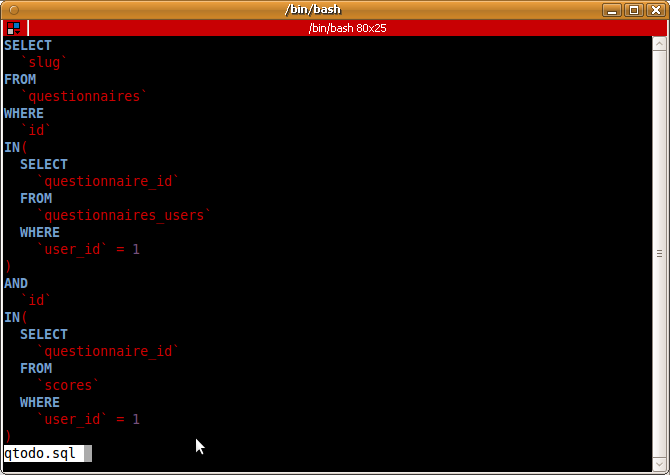
source-highlight SQL file
Be sure this line isn’t present in your .bashrc because it will interfere with source-highlight:
[ -x /usr/bin/lesspipe ] && eval "$(lesspipe)"
For CentOS/Red Hat the procedure will be comparable, but I don’t now for sure if a RPM package of source-highlight is available.
References:
The package name is the same in Fedora 15.
Thanks for pointing that out.
Any way to make this work with “<"?
I never type "less" if I can type "<".
I got it working otherwise.
Thanks!
I have no recognition of this Fortran code. source-highlight works fine via less with python though:
program pnpolexy
implicit none
include ‘pipe1.inc’
character*80 desfile,junk
character*48 lonparam,latparam
integer*4 loncol,latcol
integer*4 ios,iunit,ndeslines,ifound
real*8 lon,lat,pi,npolex,npoley
pi=dacos(-1.d0)
call getcmdchar(‘lon’,1,’required’,ifound, lonparam)
call getcmdchar(‘lat’,1,’required’,ifound, latparam)
c check for descriptor file in command line
call getcmdchar(‘des’,1,’optional’,ifound, desfile)
if( ifound .eq. 1 ) then
c if des found, read from unit 7
iunit=7
else
c else, get descriptor from standard input
iunit=5
endif
call pdesread(iunit, desfile, cdesheader,
& cdesstitle, cdesltitle,
& ndeslines)
Is it because this code seems to NOT use F90 freedom and instead keeps using F77 rules?
ah, the indentation of course got lost here. But anybody else having it work fine for Fortran77/90?
Better yet: instead of commenting out the “lesspipe” line in .bashrc, keep it and use lesspipe’s “~/.lessfilter” functionality with something like this:
#!/bin/bash
file “$1” | grep -q text && \
/usr/share/source-highlight/src-hilite-lesspipe.sh “$1”
to get the best of both worlds!
Really usefull… Thanks for mentioning it
Kicks ass
Very helpful. Thanks a lot.
Thank for -R option sharing)
In RedHat distros it’s
/usr/bin/src-hilite-lesspipe.sh
Nice 🙂
Amazing! Thanks!
Amazing!
Thank you very much!
this works fine when I run less against a file, but not when I read from a pipe, e.g. xmllint –format | less
I have commented out the lesspipe line as you specify
Fantastic! This worked perfectly for me (Ubuntu 18.04, zsh).